Nintendo is not going to brick your Switch just for modding it

Since people are freaking out about a new update to the Nintendo Account EULA (archive link), let’s clarify this statement, emphasis mine:

Without limitation, you agree that you may not (a) publish, copy, modify, reverse engineer, lease, rent, decompile, disassemble, distribute, offer for sale, or create derivative works of any portion of the Nintendo Account Services; (b) bypass, modify, decrypt, defeat, tamper with, or otherwise circumvent any of the functions or protections of the Nintendo Account Services, including through the use of any hardware or software that would cause the Nintendo Account Services to operate other than in accordance with its documentation and intended use; (c) obtain, install or use any unauthorized copies of Nintendo Account Services; or (d) exploit the Nintendo Account Services in any manner other than to use them in accordance with the applicable documentation and intended use, in each case, without Nintendo’s written consent or express authorization, or unless otherwise expressly permitted by applicable law. You acknowledge that if you fail to comply with the foregoing restrictions Nintendo may render the Nintendo Account Services and/or the applicable Nintendo device permanently unusable in whole or in part.

This means that if the Nintendo Account gets blocked, you cannot use features of your Nintendo device that depend on the Nintendo Account (which could be things like online play or eShop), but other offline functionality would remain. These terms are also not specific to Nintendo Switch, but can cover other devices or applications that may depend on the use of an account such as Nintendo Sound Clock: Alarmo.

This is not new. Nintendo has always had the right to block people from its service for modding, even if they haven’t exercised it as much as other console platforms. Actually deliberately rendering a device unusable (or “bricking it”) would likely run afoul of laws within most countries where Nintendo operates.

The “deliberately” part is very important. Nintendo will not care if system updates break mods and end up causing a device to brick. (That’s what the warning before doing updates on the Wii and 3DS were about, that “unauthorized modifications” could break something.)

Like I said in the last post, the point of this is not to defend or criticize Nintendo or fans who are upset at the corporation. One can feel however they want about Nintendo’s stance towards console modding. But spreading misinformation only makes things worse for everyone.
Notes on playing Super Paper Mario with a standard controller

I recently finished playing Super Paper Mario (for probably the sixth time), and I did so across my Steam Deck and my PC with an Xbox controller. Since this is a Wii game that depended on Wii Remote motion features, making it work on the common gamepad is non-trivial. Specifically, these need workarounds:

  • Pointing at the screen for Tippi’s tattle, the minigames Forget Me Not and Mansion Patrol, and some items like Ghost Shroom
  • Horizontal remote shaking for Stylish moves, recovering from sleeping or being frozen, a thing in the Chapter 3 boss fight, and some items like Fire Burst
  • Vertical remote shaking for some items like Mighty Tonic
  • Tilting for the Tilt Island minigame, and some items like Long-Last Shake
  • Swinging for the minigame Hammer Whacker

Thankfully, it’s much easier today to play most of the game with a standard controller by using a hack to add Classic Controller compatibility. This was done by GBAtemp user Vague Rant. The post with Gecko codes and button binding is available here.

Unfortunately, as of March 2025, this hack does not cover motion-related features. The pointer is implemented as a button toggle and uses the joysticks, but items and minigames that require shaking, tilting, and swinging, still require the use of a real Wii Remote. Through an emulator, however, it’s possible to bind these actions to buttons and joystick.

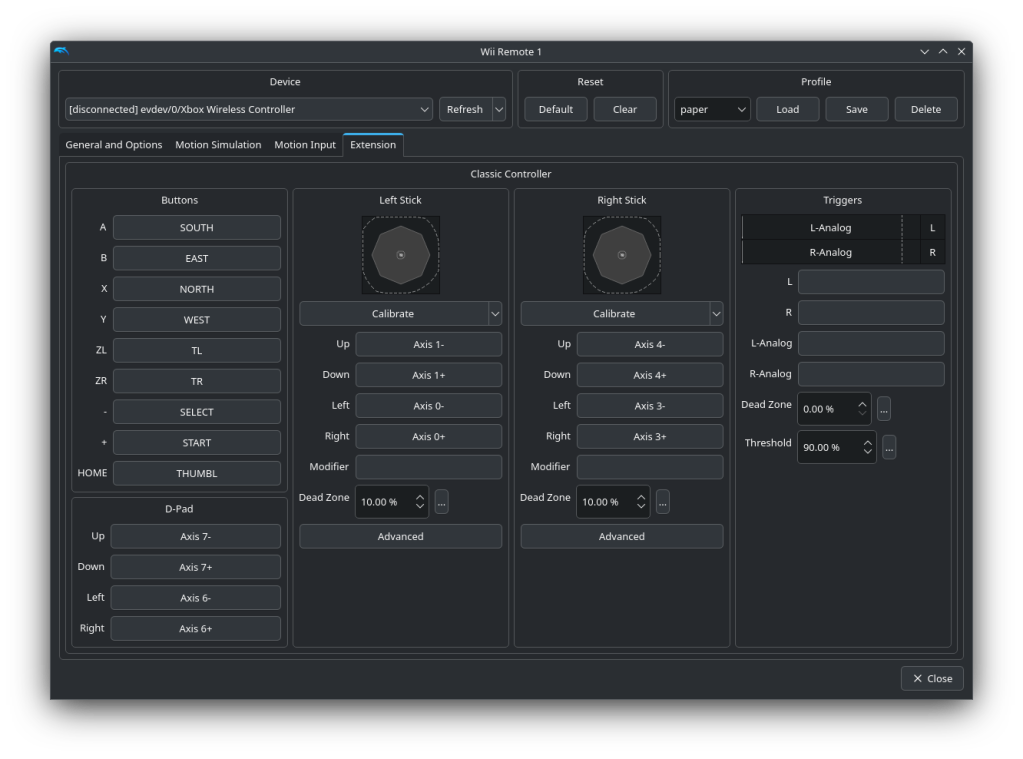
In my case, I decided to bind ZL to horizontal shake (Z axis), ZR to vertical shake (Y axis), and right stick to tilting. Tilt binds should be “rotated”; that is, forward tilting should actually be pushing the right stick left, and left tilting is pushing down. (I don’t know if the “Sideways Wii Remote” affects tilt binds.) Horizontal shake works well to fill meters, but seems not perfectly reliable for Stylish moves.

On the Classic Controller pairing, make sure to remove the binds for the L and R buttons (which confusingly will be bound to the Xbox controller’s ZL/ZR buttons), so it doesn’t conflict with the shake motion binds. L and R refers to the triggers on the right side of the window, not ZL and ZR non-analog buttons, nor the Xbox controller’s L and R non-analog buttons.

Dolphin controller configuration screen for a Wii Remote. The "Extension" tab is visible and shows configuration for the Classic Controller extension.
Dolphin controller configuration for the Classic Controller.

As for swinging, it only seems to be used for the Hammer Whacker minigame as far as I know. I decided to bind forward swing to the Xbox controller’s R button. Even though it overlaps with the Classic Controller’s ZR button, the swing action shouldn’t affect anything else. In my testing, the swing action works pretty reliably for the minigame, never missing any shots.

While it’s possible to instead bind motion features to the gyroscope of a compatible controller (such as the Steam Deck or PlayStation controllers), I decided to go for a motion-less setup for compatibility with Xbox controllers.

Make sure to save the controller layout and have it automatically load. That is, put in the GameINI:

[Controls]
WiimoteProfile1 = YourLayoutName

Bypassing Warp’s login requirement

I recently came across an application called Warp (warp.dev) that claims to be a “blazingly fast, Rust-based terminal” and is “fully native”. It has some interesting features such as blocks to separate the output of different commands.

It comes with some extra things though: required login and forced telemetry. The latter can be blocked with a firewall such as Little Snitch. However the former requires some more work to bypass.

When I first downloaded it and saw that it required a login, I almost decided to just trash it (as would most people I imagine). But I figured I might instead create an account so I can see how much effort it would take to force it to run with no details.

Warp has configuration data in 3 places (that I know of):

  • ~/Library/Application Support/dev.warp.Warp-Stable
  • ~/Library/Preferences/dev.warp.Warp-Stable.plist
  • An application password entry in the “login” keychain

The directory in “Application Support” has an SQLite database called warp.sqlite, but it contains no interesting details about logins or sessions or related things. (It also had a file called telemetry_events.json which was an empty list – I imagine this would have more details if I didn’t block Warp’s network connections)

The plist has at least 4 keys: Shortcuts, FontSize, SystemTheme, and ChangelogVersions.

After I didn’t find any details here, I looked online and found out that Warp uses the keychain for login information. This makes sense, I guess I’m not used to messing with the keychain (most of the applications I use don’t use it).

Warp’s addition in Keychain Access.

The “password” in the keychain entry is JSON containing login details. The format looks like this after I logged in with GitHub (formatted for readability):

{
    "id_token": {
        "id_token": "xxx",
        "refresh_token": "xxx",
        "expiration_time": "2022-07-10T00:50:24.964731-07:00"
    },
    "refresh_token": "xxx",
    "local_id": "xxx",
    "email": "example@example.com",
    "display_name": "ihaveahax",
    "photo_url": "https://avatars.githubusercontent.com/u/590576?v=4",
    "screen_name": "ihaveamac"
}

So the question now is, how many of these can I change until Warp stops letting me into the actual terminal? I started poking at this by inserting custom JSON into the keychain.

The security command has the ability to view, add, and delete stuff from the Mac keychain. (To view Warp’s entry: security find-generic-password -s 'dev.warp.Warp-Stable' -g)

I made a quick custom script to make it easy to generate JSON and modify the keychain entry. After some prodding, I figured out the minimal amount of data required is only “expiration_time“. Every other key can be empty.

{"display_name":"","email":"","id_token":{"expiration_time":"2022-07-10T00:50:24.964731-07:00","id_token":"","refresh_token":""},"local_id":"","photo_url":"","refresh_token":"","screen_name":""}

This can be inserted into the keychain with one command:

security add-generic-password -a 'User' -s 'dev.warp.Warp-Stable' -U -w '{"display_name":"","email":"","id_token":{"expiration_time":"2022-07-10T00:50:24.964731-07:00","id_token":"","refresh_token":""},"local_id":"","photo_url":"","refresh_token":"","screen_name":""}'

This will probably change in the future if they decide to tighten the restrictions on logins, but for the time being one can use the offline features of Warp without giving any data to the developers. (Except for whatever I had to give to get past the first step.)

(It’s worth pointing out that Warp is a company that received $23 million from venture capital funding.)


This is the script to generate and insert into the keychain.

from json import dumps
from subprocess import run

data = {'display_name': 'ihaveahax',
 'email': 'ian@ianburgwin.net',
 'id_token': {'expiration_time': '2022-07-10T00:50:24.964731-07:00',
              'id_token': 'xxx',
              'refresh_token': 'xxx'},
 'local_id': 'xxx',
 'photo_url': 'https://avatars.githubusercontent.com/u/590576?v=4',
 'refresh_token': 'xxx',
 'screen_name': 'ihaveamac'}

data['id_token']['id_token'] = ''
data['id_token']['refresh_token'] = ''
#data['id_token']['expiration_time'] = ''
#data['id_token']['expiration_time'] = 'a'
data['local_id'] = ''
data['refresh_token'] = ''
data['photo_url'] = ''
data['email'] = ''
data['screen_name'] = ''
data['display_name'] = ''

run(['security', 'add-generic-password', '-a', 'User', '-s', 'dev.warp.Warp-Stable', '-U', '-w', dumps(data)])