-
More details on why the Nintendo Switch 2 may not be hacked
I last posted “Don’t get your hopes up for Nintendo Switch 2 homebrew” when the console was revealed in January 2025. In this post I hope to give better explanations as to why that is.
Updated July 5, 2025 to address the userland exploit, and how games are sandboxed. Updated September 27, 2025 to include an additional post from SciresM.
No software vulnerabilities
The Nintendo Switch has no software vulnerabilities for modern versions. The last time there was a software-based exploit one was Caffeine, available up to version 4.1.0, released December 2017.1 There is also the RCM bug, usable on Switch 1 units produced up to around June 2018, which requires no hardware modifications to use.
SciresM, the lead developer of Atmosphère, in addition to multiple other experienced hackers, have thoroughly examined and re-implemented the microkernel of the Switch OS (also known as Horizon), and believe that it contains no exploitable bugs. In tweets from November 2020:
I’ve re-implemented their secure monitor as open source software twice. It has no bugs. I’ve re-implemented their kernel as open source software. It has no exploitable bugs. Software hax isn’t happening unless NV made bootrom mistake (unlikely imo).
xbox one has successfully gone an entire generation without software compromise vulnerabilities.2 Nintendo’s secure monitor has 300 functions. Its kernel has ~800. These are tiny binaries, small enough that it’s possible to get them right. I’m less confident in NV’s code, but.
In a post on GBAtemp from August 2025:
I invite everyone actually competent to do research, please, more fresh eyes are always welcome. That said, the kernel has been thoroughly audited by myself, hexkyz, plutoo, and at least five others who I’ve sent my fully labeled IDB (reverse engineering database) to, and none of us have found anything at all. It’s very small (~600 functions, takes about eight hours to fully review), and the odds seem overwhelmingly likely that nothing will ever be found.
I sent Comex all of my reversing data in the hopes he finds it useful; if he finds a kernel bug, I would be thrilled. It is not impossible that I (and many others) have all missed something that he as another talented dev might find. But, I do think people should temper their expectations and mostly expect it to not happen.
It is known already that the Switch 2 OS is based on Horizon, due to Switch 2-specific code being accidentally left in recent Switch 1 updates. So it is going to carry over the already very secure kernel.
What about game exploits for userland access then? Unfortunately this is also a non-starter due to address space layout randomization (ASLR). The usual kinds of exploits such as buffer overflows would not be useful. This is also true for Switch 1 and why no game exploits have appeared on it. Even if a game exploit is used, sandboxing means games (and homebrew that run under them) are restricted in what resources can be accessed, such as the SD card.
Hardware mods will be more difficult, if not impossible
All Switch 1 models can get a modchip installed to run custom firmware. But it is unlikely this will be as easy on Switch 2. We know for a fact that it uses the Nvidia Tegra T239 SoC, which contains new features to guard against physical attacks, including anti-glitching mechanisms.
This keynote by Nvidia goes into further details about the security.
More stuff
As a reminder, Nintendo will not brick your console for modding it.
SciresM stated on a livestream that they will not be developing a custom firmware for Switch 2 in the event it does get a hack enabling full system access.
Switch 2 does not require a day one firmware update to use it to play Switch 2 games, but it is for Switch 1 backwards compatibility and microSD Express support. I need to make this point clear because there’s been misinformation going around claiming “Switch 2 is totally unusable without day one update!”. (Though this point is moot anyway, as softmods are unlikely to ever happen.)
In my opinion, if you want to play all the games you ever want on a portable device, there have been a slew of handheld gaming PCs introduced since Switch 1, such as the Steam Deck or Lenovo Legion Go (that one even has split controllers just like Joy-Cons!), which would be better investments than waiting for a Switch 2 hack that may never materialize.
Update: What about that userland game exploit?
On launch day, David Buchanan (also known as retr0id) posted a video where a Switch 1 game running on Switch 2 was exploited to show a graphical demo. The save exploit was transferred over from a Switch 1.
As mentioned earlier however, due to sandboxing, userland exploits do not provide useful access to console features, such as the SD card.
Notes
- Caffeine is not technically 100% software. It depends on a hardware bug only available on Erista units. Atmosphère uses this to enable the “reboot to payload” feature. It is not present on Mariko units (Switch Lite, OLED, and 2019 original model refresh), meaning even if Nintendo did not fix Caffeine in software, it would be unusable on newer units and Switch 2. But none of this matters because Nintendo did fix it in March 2018. ↩︎
- Okay technically the Xbox One / Xbox Series did get a kernel exploit years later, known as Collateral Damage. I do not follow Xbox modding scenes so I’m not aware of its capabilities, but I know that it’s a consequence of the OS being based on Windows, since the exploit has its origins in Windows. Whether or not you want to use this to claim “So Switch 2 may have softmods!” is up to you, despite the situation being entirely different. ↩︎
-
Nintendo is not going to brick your Switch just for modding it
Since people are freaking out about a new update to the Nintendo Account EULA (archive link), let’s clarify this statement, emphasis mine:
Without limitation, you agree that you may not (a) publish, copy, modify, reverse engineer, lease, rent, decompile, disassemble, distribute, offer for sale, or create derivative works of any portion of the Nintendo Account Services; (b) bypass, modify, decrypt, defeat, tamper with, or otherwise circumvent any of the functions or protections of the Nintendo Account Services, including through the use of any hardware or software that would cause the Nintendo Account Services to operate other than in accordance with its documentation and intended use; (c) obtain, install or use any unauthorized copies of Nintendo Account Services; or (d) exploit the Nintendo Account Services in any manner other than to use them in accordance with the applicable documentation and intended use, in each case, without Nintendo’s written consent or express authorization, or unless otherwise expressly permitted by applicable law. You acknowledge that if you fail to comply with the foregoing restrictions Nintendo may render the Nintendo Account Services and/or the applicable Nintendo device permanently unusable in whole or in part.
This means that if the Nintendo Account gets blocked, you cannot use features of your Nintendo device that depend on the Nintendo Account (which could be things like online play or eShop), but other offline functionality would remain. These terms are also not specific to Nintendo Switch, but can cover other devices or applications that may depend on the use of an account such as Nintendo Sound Clock: Alarmo.
This is not new. Nintendo has always had the right to block people from its service for modding, even if they haven’t exercised it as much as other console platforms. Actually deliberately rendering a device unusable (or “bricking it”) would likely run afoul of laws within most countries where Nintendo operates.
The “deliberately” part is very important. Nintendo will not care if system updates break mods and end up causing a device to brick. (That’s what the warning before doing updates on the Wii and 3DS were about, that “unauthorized modifications” could break something.)
Like I said in the last post, the point of this is not to defend or criticize Nintendo or fans who are upset at the corporation. One can feel however they want about Nintendo’s stance towards console modding. But spreading misinformation only makes things worse for everyone.
-
Let’s correct some Nintendo Switch 2 misinformation
Recently, “Nintendo Direct: Nintendo Switch 2” aired, and we got a bunch more information released afterwards. There’s a lot of incorrect info flying around, so I wanted to try and correct some of it.
Last updated April 24, 2025.
“Switch 2 Game Cards lack the game”
After the Direct, “Game-Key Cards” were revealed, which act as a license to download the game. Lots of people seem to have taken this as “Switch 2 games don’t have the game on the cards”, which is only correct for games that use Game-Key Cards. As was also revealed in the Direct, a newer Game Card for the Switch 2 was also made which features faster read speeds. So there will be Switch 2 games with the game on the Game Card.
Game-Key Cards are labeled as such on the box. One game that is not labeled is Mario Kart World, meaning this game will be on the physical card.
Read Nintendo Support’s page on Game-Key Cards.
“Game-Key Cards can’t be shared/resold”
Like mentioned before, Game-Key Cards are only different in that a download is required to play the game. They are not the same as download codes, and they still retain the other features of physical games, including the ability to share or resell them.
“Switch 2 games are US $80 digital/$90 physical”
This is not the standard price in US dollars, and the price is not confirmed to be different for physical and digital. These numbers may be correct for other regions, but in the United States, Nintendo has only listed a single price per game. For example, Mario Kart World is $79.99, and Donkey Kong Bananza is $69.99. There is currently no suggestion that digital will be cheaper here.
“Proprietary Nintendo-branded microSD cards are required”
The Switch 2 will only accept “microSD Express” cards due to the high speed requirements. Like many others, this Direct was the first time I had heard of microSD Express. However it is not proprietary to Nintendo, it is an open standard, and other devices may use it as well. It first became a standard in 2018 for full-size SD cards, and later in 2019 for microSD.
Like original microSD cards, there will be Nintendo-branded microSD Express cards, but these will be functionally no different to any other.
“Switch 2 emulates Switch 1 games”
Switch 2 is not hardware compatible with Switch 1, unlike past Nintendo consoles. But it does not emulate Switch 1 games. In Nintendo’s “Ask The Developer” series, it is clarified that it is a mixture of software emulation and hardware compatibility”
Dohta: If we tried to use technology like software emulators, we’d have to run Switch 2 at full capacity, but that would mean the battery wouldn’t last so long, so we did something that’s somewhere in between a software emulator and hardware compatibility.
Sasaki: This is getting a bit technical, but the process of converting game data for Switch to run on Switch 2 is performed on a real-time basis as the data is read in.
“Switch 2 is region-locked”
Nintendo will release a separate version of the Switch 2 that only supports the Japanese as the system language, as well as only Japanese Nintendo Accounts. This model is priced at 49,980 yen, or around 350 USD. This is not exactly the same as past region-locked consoles however, as it does not prevent you from playing out-of-region physical games, or from playing Japanese games on the “Multi-Language” variant.
Speaking of that, this means there’s no versions locked to other languages, only Japanese. This has apparently been due to the Japanese Yen being weak, and Nintendo wants to prevent people from importing a cheaper console by locking it to the Japanese language.
In Japan, the Japanese-only version will be the one available in stores, while the “Multi-Language” version is only available on the My Nintendo Store.
“Switch 2 Edition games are the Switch 1 version with an upgrade code”
In short, it seems Nintendo games will include the Switch 2 upgrade pack on the Game Card, however third-party publishers may decide to either include upgrades on the Game Card, or instead pack in a redeemable upgrade code.
According to Marvelous, Switch 2 Edition Game Cards will also work on Switch 1, and the right version will be chosen based on the console.
The Nintendo Switch 2 Edition is a red 64GB game card that includes, in full, the Nintendo Switch game and the Upgrade Pack.
There’s no need to download the full game: simply insert the card into either a Nintendo Switch or Nintendo Switch 2 console, and the correct version will launch automatically.
The confusion originated from “Does it play?”, which posted a screenshot of a response from Nintendo UK Support, claiming that the upgrade pack is only a download code.
Later, Marvelous stated on Twitter that Rune Factory: Guardians of Azuma, which is also getting a Switch 2 upgrade, will have the upgrade pack on the Game Card.
The Nintendo Switch 2 physical version of the game will be on cart, pending any patches or updates that you may be required to download.
Nintendo Prime stated on Twitter that Nintendo replied to an email about this question.
Regarding your query, if you purchase a Nintendo Switch 2 Edition of a game on physical format, you will receive one cartridge with the upgrade already in it.
However, if you already had the game for Nintendo Switch 1 and only were to purchase the expansion update, you would then receive a digital Download Code regardless if you have it on digital or physical format.
“Nintendo will break your Switch 2 for modding it”
This deserved its own post. The short answer is no they won’t.
Addendum
Nothing in this post is made to defend or criticize Nintendo or fans who are upset at the corporation. Anyone is free to feel however they want about the Switch 2 console price, game prices, Game-Key Cards, and anything else. But misinformation helps nobody. One can be upset at a corporation without making false claims.
When it comes to hacking, check my last post on it: Don’t get your hopes up for Nintendo Switch 2 homebrew
-
A brief overview of Nintendo 3DS software authentication
The Nintendo 3DS, like every modern console, attempts to prevent the use of software that was not authorized by its manufacturer. This post will attempt to answer two questions:
- Why you can’t install unsigned software without custom firmware
- Why you can’t create custom game cards
The 3DS uses RSA to verify the authenticity of software. Nintendo signs software with a private key, and under normal circumstances, the 3DS will only execute software that can be verified with a public key.
Game card images (i.e. .3ds/CCI) contain signatures that are only valid to game cards. Digital software releases (i.e. CIA) contain signatures that are only valid to digital software.
Digital software that comes from Nintendo eShop come with a ticket that is signed for the particular console it’s for. This ticket can’t be installed to a different console.1
Flashcarts like Sky3DS / Sky3DS+ / Stargate will emulate a game card in a way that the 3DS accepts. And if an original, unmodified game card image is presented, this game can be played without any system modifications. However they cannot forge the signature, as the 3DS operating system will still verify that it’s valid. Any attempts to modify the data or create custom titles will fail this signature check.
As game cards and digital software have their own signatures, any attempt to “convert” a digital game to a game card image and vice versa will result in a title with a signature that does not validate against Nintendo’s public key.
Since we do not have Nintendo’s top secret and confidential retail signing keys, we cannot run software on the 3DS without exploiting holes in existing software. The relevant private keys have not appeared in any leaks.
The closest equivalent to a private key leakage for a game console was the PlayStation 3, however this was mainly due to Sony failing to do the math right.
- There’s an exception for software that comes pre-installed, tickets for these are signed for all consoles. ↩︎
-
Notes on playing Super Paper Mario with a standard controller
I recently finished playing Super Paper Mario (for probably the sixth time), and I did so across my Steam Deck and my PC with an Xbox controller. Since this is a Wii game that depended on Wii Remote motion features, making it work on the common gamepad is non-trivial. Specifically, these need workarounds:
- Pointing at the screen for Tippi’s tattle, the minigames Forget Me Not and Mansion Patrol, and some items like Ghost Shroom
- Horizontal remote shaking for Stylish moves, recovering from sleeping or being frozen, a thing in the Chapter 3 boss fight, and some items like Fire Burst
- Vertical remote shaking for some items like Mighty Tonic
- Tilting for the Tilt Island minigame, and some items like Long-Last Shake
- Swinging for the minigame Hammer Whacker
Thankfully, it’s much easier today to play most of the game with a standard controller by using a hack to add Classic Controller compatibility. This was done by GBAtemp user Vague Rant. The post with Gecko codes and button binding is available here.
Unfortunately, as of March 2025, this hack does not cover motion-related features. The pointer is implemented as a button toggle and uses the joysticks, but items and minigames that require shaking, tilting, and swinging, still require the use of a real Wii Remote. Through an emulator, however, it’s possible to bind these actions to buttons and joystick.
In my case, I decided to bind ZL to horizontal shake (Z axis), ZR to vertical shake (Y axis), and right stick to tilting. Tilt binds should be “rotated”; that is, forward tilting should actually be pushing the right stick left, and left tilting is pushing down. (I don’t know if the “Sideways Wii Remote” affects tilt binds.) Horizontal shake works well to fill meters, but seems not perfectly reliable for Stylish moves.
On the Classic Controller pairing, make sure to remove the binds for the L and R buttons (which confusingly will be bound to the Xbox controller’s ZL/ZR buttons), so it doesn’t conflict with the shake motion binds. L and R refers to the triggers on the right side of the window, not ZL and ZR non-analog buttons, nor the Xbox controller’s L and R non-analog buttons.
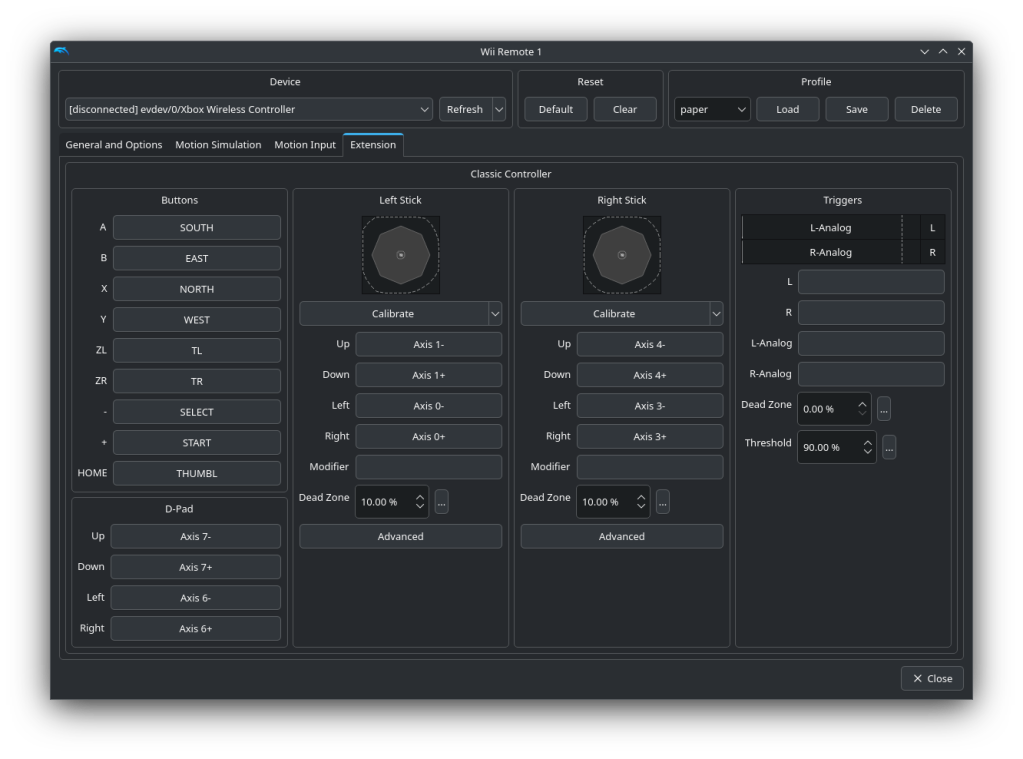
Dolphin controller configuration for the Classic Controller. As for swinging, it only seems to be used for the Hammer Whacker minigame as far as I know. I decided to bind forward swing to the Xbox controller’s R button. Even though it overlaps with the Classic Controller’s ZR button, the swing action shouldn’t affect anything else. In my testing, the swing action works pretty reliably for the minigame, never missing any shots.
While it’s possible to instead bind motion features to the gyroscope of a compatible controller (such as the Steam Deck or PlayStation controllers), I decided to go for a motion-less setup for compatibility with Xbox controllers.
Make sure to save the controller layout and have it automatically load. That is, put in the GameINI:
[Controls] WiimoteProfile1 = YourLayoutName -
How did Nintendo stop easy eShop piracy on the Nintendo 3DS?
In July 2018, Nintendo released Nintendo 3DS system software 11.8.0. This dealt a major blow to one method of piracy: direct downloads from the eShop. But how was it possible to pirate games directly from the storefront? Let’s find out!
How an eShop purchase works
Software on the 3DS needs a ticket installed to the console before it can be used. This ticket is typically signed with data tied to the specific unit it’s downloaded on, although there are exceptions for system software and pre-installed titles. When you purchase a title on the eShop (including free applications), the server generates this ticket, the console downloads and install it. This ticket also includes an encryption key (known as the “title key”) needed to decrypt the application contents, which is the same for all consoles.1
The next step is to download the software itself. This is hosted on a CDN (content delivery network) separate from the eShop servers. This includes the TMD (title metadata), used to find out what files to download, and then the actual application contents. The contents are encrypted using the key in the ticket, and the console decrypts this layer during the download.
Where it went wrong
The biggest mistake here was not requiring any authorization to download game contents. This was not necessarily a catastrophic failure – since the contents are encrypted, if you don’t have the key, the data is effectively garbage.
But someone, I believe in 2016, realized that if you share the keys around, you can decrypt the contents. A common base ticket can be used, and the game’s Title ID and title key can be inserted. This is enough for a modded console to run software, but it turns out, the eShop kinda sorta treats these games as purchased. It doesn’t appear on the account’s re-downloadable software, but when going to the game page, the re-download button appeared.
The discovery of this oversight quickly led to tools to facilitate downloading games for free from the eShop. They would download and install tickets to the console, and then users could go download the games from the eShop. Soon after that, eShop so-called “replacements” appeared to further streamline piracy. The most famous of these applications was freeShop.
What Nintendo changed to block it
Nintendo’s fix to block eShop piracy was relatively simple: the CDN servers required the ticket be sent in the request to download application contents. The ticket has to be signed, so it would have to come directly from the eShop servers. Enforcement did not start immediately, but it was rolled out in the following month.
This completely cut off downloading unpaid eShop software2, as tickets cannot be correctly signed by anyone but Nintendo, and due to personalized tickets containing console-unique data (which could lead to a possible ban), nobody wanted to share theirs. Thus freeShop and applications like it were discontinued, and everyone had to return to old-fashioned piracy.
Follow-up
This system of tickets has technically been in place since the Wii days. This means the same piracy could have happened with the Wii Shop Channel, DSi Shop, and even the Wii U eShop. Yet as far as I know, nobody did this until the 3DS. Why?
Well… I don’t actually know why in the case of Wii and DSi. But my speculation is that games from these digital storefronts were really small; the largest a WiiWare game could be was 40MB. It’s a lot easier to share the games themselves around. Meanwhile, 3DS games can be as large as 4GB, providing an incentive to share only title keys while eShop piracy was still possible.
Notes
Updated on January 26, 2025 to clarify pre-installed titles.
- This is a bit of a simplification. The actual ticket as transmitted over the network has the title key encrypted using a per-console key. But this layer of encryption is removed when it is installed to the console’s ticket database. Most people have never had to deal with this part, and is not exactly relevant to how eShop piracy was enabled. But I’m putting it here for accuracy’s sake. ↩︎
- There are very limited exceptions. Titles that came pre-installed in special bundles included a ticket that was signed for use on all systems, so these could be shared around and still downloaded from the eShop. ↩︎
-
Why is a Nintendo 3DS with custom firmware safer than stock?
I’ve sometimes made the point that I think using custom firmware on the Nintendo 3DS makes the console safer than one without. Since this point might seem confusing to those who deal with hacking/jailbreaking/rooting other consoles or devices, I want to outline why I think this is so.
Back up games, saves, and system storage
This is probably the most obvious one, it provides the ability to back up your games and saves (whether digital or game cards), plus the system storage (a.k.a. NAND). That protects you in cases like lost SD card, accidental deletion, or random corruption. Especially as SD cards are not perfectly reliable.
With a stock console, you’re able to copy the contents of the SD card to another device. This works as a very simple backup, but it comes with some caveats:
- The contents of the saves cannot be accessed. If the console itself is lost, damaged, or formatted, the saves are as good as gone.1 Even with game cards, some games store “extra data” on the SD card, which is just as tied to the console as digital games. In a few cases such as Fantasy Life, the save isn’t on the game card at all.
- Some games implement anti-restore features, such as Pokémon and Animal Crossing. Trying to restore an old backup will cause these games to refuse to load without either the newest save being loaded, or the save being erased.
Protect your console and saves from bricks
There are a few ways that a console can stop turning on. Software-wise, the most common methods usually involve messing with system files.
But wait, isn’t that something you can only do with homebrew? Yes, that’s something that one couldn’t do without already having custom firmware. However, there are still ways for a console that has never ran any form of homebrew to break itself:
- System save problems: On occasion, a system save might get corrupted or for some other reason break in a way that prevents the console from booting. This happened to mine in early 2015. My then-completely-stock console would no longer boot to the HOME Menu. It would turn on to a black screen, while pressing POWER would show the power off screen. I eventually sent it in for Nintendo repairs. I later found out that this was due to some system save or extra data related to the HOME Menu got some kind of issue, since I saw it come up on other consoles.2
- Hardware failure: Various components of the console can fail at any point, seemingly at random. While some of these are not necessarily catastrophic failures (i.e. camera failure simply blocks camera features in games), some can render a console unusable. RAM failure is perhaps the most devastating, as it is something that requires an entire console replacement (or at least the motherboard), and can hardly be influenced by the user or software.
A console with access to tools like GodMode9 is able to fix software-related problems, while make backups in certain cases of hardware failure. But even when parts like RAM or displays are broken, there are specialized dumping tools like DannyAAM’s 3DS essential file dumper, that works on any modded console that is able to power on in any form. This would enable transferring data to another console.
Now a stock console is not completely without options. ntrboot can be used to boot into custom payloads on any 3DS with a working game card slot. While this is a solution to either fix a software-related brick, or to make backups from one with hardware failures, it requires the purchase of a compatible Nintendo DS flashcart.
There are literally no practical downsides
This is not like jailbreaking or hacking most other consoles – custom firmware on the Nintendo 3DS does not inherently break anything. All games work just as well as before. System updates are safe (though it seems unlikely Nintendo will ever release another one). When these services were fully available, Nintendo eShop and online play were fully functional, no spoofing or workarounds required.
(If it’s not clear enough, you should totally hack your 3DS. There’s a reason that “modding a 3DS is surprisingly easy” is a popular meme, it’s because it’s true.)
Notes
- Technically, it is possible to recover saves using seedminer, if another 3DS had the console in question added as a friend. But this is not guaranteed – the other console needs to run homebrew, and even then, seedminer does not have a 100% success rate. ↩︎
- Specifically, the
f000000bsystem extdata. ↩︎
-
Don’t get your hopes up for Nintendo Switch 2 homebrew
With the recent reveal of the Nintendo Switch 2, I’ve seen many people ask if it can be hacked, and how it will happen. I’ve already posted about this on social media, but I figured I would make this post that I can easily point to.
Please don’t expect there to be easy homebrew for the Nintendo Switch 2. There are several reasons for this.
- The console is not out yet! Until it’s released and in people’s hands, literally everything is pure speculation.
- The current Nintendo Switch has no software-only exploits. The last time there was one that didn’t require hardware modification was the RCM exploit for units produced before June 2018. Since then, a mod chip is required.
- The microkernel of the Switch is small and very secure. To quote SciresM, the lead developer of Atmosphère: “I genuinely believe the microkernel/EL3 secure monitor to have zero security bugs.”
Nintendo did security right with the Nintendo Switch, and this is unlikely to change for the successor. Especially if it’s going to run largely the same software.
May 2025 update
An update to the Nintendo Account EULA has people worried that Nintendo will brick their Switch 2 for modding it. The short answer is no they won’t. The longer answer is in its own post here: Nintendo is not going to brick your Switch just for modding it
June 2025 update
I have made a follow-up post going into more details: More details on why the Nintendo Switch 2 may not be hacked
-
How I manually resized TWLNAND on my 3DS
In early 2024, I tried to resize the partitions on my New 3DS device, specifically to increase the space for TWLNAND, the space that hold DSiWare. I wanted to store more DSiWare than there was available space.
This isn’t a tutorial! This is only my experience trying to do so. You should not attempt this without ntrboot because this can actually brick your console if done improperly.
Also, I only finished this post many months after I had done it, so some of the details are a bit fuzzy, but it wasn’t a difficult process overall. At least the resizing part wasn’t…
What to resize and shift around
What defines the size of TWLNAND, and how can I increase the size of it? The Nintendo 3DS NAND is split up into 5 different partitions, with a custom NCSD header. In order they are:
- TWLNAND
- AGBSAVE (Game Boy Advance VC save data)
- FIRM0
- FIRM1
- CTRNAND
For compatibility reasons with the Nintendo DSi, TWLNAND is the first partition. So when I resize it, I have to shift forward everything else by the same amount.
TWLNAND is itself partitioned into “twln” (holding DSiWare games and data) and “twlp” (camera photos). It starts at the first block of the NAND, meaning it takes up space within the NCSD header. The last 0x42 bytes of the header are dedicated to the TWL MBR. And because “twln” is the first partition within TWLNAND, this also means “twlp” will have to be pushed forward.
Let’s make a custom NCSD header
If I want to increase the size of TWLNAND, I must create a custom NCSD header with my own partitioning. My own pyctr library makes this easy.
I took the partition data from the stock header and adjusted offsets and sizes by a fixed amount. I increased TWLNAND by about 350 MiB. That means I had to shift forward AGBSAVE, FIRM0, FIRM1, and CTRNAND by this amount, and shrink CTRNAND by it. I included here the script I made to create a new NCSD header that resizes TWLNAND and shifts forward every other partition by the same amount.
from pyctr.type.nand import NANDNCSDHeader, NCSDPartitionInfo, SIGHAX_SIGS

diff = 367001600  # 350 MiB

custom_partition_table = {
    0: NCSDPartitionInfo(fs_type=1, encryption_type=1, offset=0, size=185597952 + diff, base_file='twl'),
    1: NCSDPartitionInfo(fs_type=4, encryption_type=2, offset=185597952 + diff, size=196608, base_file='agb'),
    2: NCSDPartitionInfo(fs_type=3, encryption_type=2, offset=185794560 + diff, size=4194304, base_file='firm'),
    3: NCSDPartitionInfo(fs_type=3, encryption_type=2, offset=189988864 + diff, size=4194304, base_file='firm'),
    4: NCSDPartitionInfo(fs_type=1, encryption_type=3, offset=194183168 + diff, size=1106051072 - diff, base_file='ctr_new')
}

a = NANDNCSDHeader(
    # sighax has to be used here as the official signature will be invalidated
    signature=SIGHAX_SIGS['retail'],
    image_size=1342177280,
    actual_image_size=1300234240,
    partition_table=custom_partition_table,
    unknown=b'\x00\x00\x00\x00\x00\x00\x00\x00\x00\x00\x00\x00\x00\x00\x00\x00\x00\x00\x00\x00\x00\x00\x00\x00\x00\x00\x00\x00\x00\x00\x00\x00\x00\x00\x00\x00\x00\x04\x00\x00\x00\x00\x00\x00\x01\x00\x00\x00\x00\x00\x00\x00\x00\x00\x00\x00\x00\x00\x00\x00\x00\x00\x00\x00\x00\x00\x00\x00\x00\x00\x00\x00\x00\x00\x00\x00\x00\x00\x00\x00\x00\x00\x00\x00\x00\x00\x00\x00\x00\x00\x00\x00\x00\x00',
    # this will be overwritten when twlnand is formatted
    twl_mbr_encrypted=b'\0' * 0x42
)

with open('nand_hdr-custom.bin', 'wb') as f:
    f.write(bytes(a))
Build the new NAND
Once this custom header is written, a NAND image needs to be built. My ninfs tool can mount an image, even one with blank partitions, so I can then format TWLNAND and CTRNAND. For this, one can use standard tools, and on macOS, I used diskutil.
I first attached the raw disk images. Then I used diskutil command to make twln use as much space within TWLNAND as it could, while twlp remained the same as before:1
diskutil partitionDisk -noEFI disk# 3 MBR \
        free free 76288B \
        'MS-DOS' twln R \
        'MS-DOS' twlp 34301440B
Formatting CTRNAND is simple since it is a single partition.
diskutil partitionDisk -noEFI disk# 1 MBR 'MS-DOS' ctrn RNow that TWLNAND and CTRNAND are formatted, they can be mounted and all the data from a previous NAND image can be copied like normal. The same applies to AGBSAVE, FIRM0, and FIRM1.
Now that hopefully the NAND image has all the same files as before, I can restore it to my console. There’s a slight catch, in that because partitions are not in the same places, GodMode9’s safe restore cannot be used. An explicitly unsafe restore must be performed by manually injecting the new NAND image into the system.2
An unexpected problem…
The NAND restore was a success! My console booted to the HOME Menu like normal, and GodMode9 could see the new space. “SYSNAND TWLN” is now 493.9 MB instead of the stock 143.6 MB.

GodMode9 drive view. SYSNAND TWLN is 493.9 MB. There was however one problem, the system software did not recognize the additional space. It still read about 1,000 open blocks.

Nintendo eShop download screen. This was a real problem… How would I use this free space if the system doesn’t think there’s more of it? Oh I know, I’ll dump all my eShop titles to CIA and use FBI to install them!
Installing all my DSiWare manually
I used cleaninty to download all my purchases. Once I had all of them, I stuck them in a folder and let FBI do the rest. Only, it turns out it couldn’t do it either; after a few installed, it started failing. I forgot the exact error code, but the AM service (which actually does the installing) was rejecting it because it also thought TWLNAND was full.
There is actually a third option here, and that is GodMode9. It can also install CIAs, and since it directly interacts with twln, it doesn’t have to deal with AM being upset. But I ran into two issues here.
The first was that CIAs created with cleaninty can only be installed within the 3DS “operating system”. This is because the encrypted title key in the ticket is itself encrypted with a per-console key.3 This leaves GodMode9 unable to decrypt the titles.
Okay, so I decided I’d take the easy but mildly tedious approach of:
- install as much as I can with FBI
- dump the installed DSiWare to CIA again with GodMode9
- delete all the installed titles
- repeat from step 1 until all software has been processed
There, now I’ve got all my DSiWare ready. So I’ll just install of it, right? No, because the second issue GodMode9 for some reason starts to fail once I’ve installed around 5 titles or so. Thankfully, this one wasn’t that tough to deal with, as the error went away on a reboot. So the loop here was:
- install 5 titles
- reboot GodMode9
- repeat until all software was installed
Finally after all that, I had finally gotten all my DSiWare installed, which was exactly 40 titles and added up to 231.6 MB in CIA files.
Considering that AM didn’t like it when I tried to force through more data than it wanted, I wondered what it would think about me subverting its space enforcement…

Nintendo DSiWare Management section of System Settings. I think this counts as a pretty cursed image if you ask me.
This has been my setup since March 1, 2024, and my console has worked pretty well ever since. I just realized while writing this though that having exactly 40 DSiWare from the eShop means that I can’t use it with other homebrew DSiWare like TWiLight Menu++ or GodMode9i. So I might have to figure out some stuff to delete after all…
Notes
- Something to keep in mind for specifically New 3DS is the secret key sector (sector0x96). twln needs to be put after it so it doesn’t overwrite it. In this command, the free space is 0x95 (76288 // 512) sectors – this doesn’t include the sector containing the MBR, so this means there would be 0x96 sectors until twln starts at sector 0x97, preserving the secret key sector. ↩︎
- Those who are very paranoid could try out their NAND alterations with EmuNAND. Though this would not be an excuse to restore this to SysNAND without ntrboot as it’s still a big risky change to make to one’s console. ↩︎
- This is why any “legit CIAs” made by GodMode9 of eShop-downloaded software cannot be installed with FBI or any other 3DS-mode software installer. ↩︎
-
Adventures of installing third-party software on Steam Deck
Ever since I got my Steam Deck I’ve been wanting to use it for other general Linux stuff. Today I use it to supplement my main computer, an Apple Silicon Mac. Having an x86-64 Linux device that I can ssh in to do things like build and use x86-64 Docker images has been useful.1
Thing is, there isn’t really a good way to install stuff that isn’t on Steam or available as a Flatpak. So I tried a few options, and these are my experiences with them.
Disable read-only on the root filesystem
This is definitely the easiest method of them all. Just using
steamos-readonly disablewill let you install and upgrade packages using pacman like standard Arch Linux. (Make sure to then dosteamos-readonly enableafter!)The main problem with this one is that OS upgrades will wipe out changes that you make. This can be countered with a script that auto-reinstalls the packages you want. But there are other potential problems. The OS partition does not have a lot of free space to it; as of SteamOS 3.5, around 2 GiB. If you want to install a lot of packages or some very large ones, that’s gonna give you a bad time.
Additionally, pacman may not be able to properly handle packages that just vanish without a true uninstall. Packages leave files around in places like
/etc, and when trying to re-install, it will complain about files that already exist. (One quick way to work around this is--overwrite \*if you don’t care about what it might overwrite.)One other thing if you specifically try to set up a development environment on Steam Deck. SteamOS strips out a lot of unnecessary files from packages such as man pages and header files. Re-installing may help with this, but it will very quickly wipe out what little free space there is on the OS partition.
Final problem is that the SteamOS package repository is not kept in constant sync with the Arch Linux repository. Packages will be outdated. This affects some worse than others, like web browsers. You could potentially work around this by installing newer packages from archlinux.org, but then you can run into even more issues, especially with SteamOS’s glibc being older.
systemd-sysext
I first heard of systemd-sysext by this blog post by Alberto Garcia. It is basically “system extensions” that are used as an overlay on
/usrand/opt. It doesn’t require disabling the read-only seal on the OS partition.This is a neat idea, but it has more problems to it. You need to manually extract package contents and then pack them into a filesystem image. Because of this, it won’t be properly installed and pacman won’t do things like run install hooks. This one is a bigger problem if what you want to install contains stuff like kernel modules or systemd units. dkms, if it’s even installed, won’t find it and build the modules for you, you have to do it yourself. And systemd won’t automatically load units in an extension because extension images are not loaded until later.
It also only modifies
/usrand/opt. Packages that add to/etcand other places need their files copied manually. It’s also still tied to the OS version and extensions need to be rebuilt after every OS upgrade. It does however not have the free space problem of the OS partition, so you can install large packages this way.I used this method for a while as I was willing to put up with the limitations and install some large packages like VMware Workstation. I automated rebuilding extensions and even the building of kernel modules and setting up systemd units.
I had a script that would use pacman to download packages that were not already installed in the base system, and then extract them to make an extension image. This was when pacman’s database was still at
/var/lib/pacman, so using it to do anything but install packages to the system worked fine. However SteamOS 3.5 (still in preview at the time of this writing) moved it to/usr/lib/holo/pacmandb, so now I need to disable read-only on the OS partition to do this.After my script broke I decided to stop using this method. It required too much manual work to use.
Overlay filesystems
I experimented with Linux’s overlay filesystem. This would “mount”
/usras read-write, but any changes go to another location. (Before SteamOS 3.5, it would be a good idea to make/var/lib/pacmaninto an overlay too.)I didn’t try it for very long, mostly because I found unmounting to be problematic. I didn’t realize at the time that this may be because directory overlays on the default SteamOS setup may be problematic due to casefolding on the
/homepartition (for reference, the root filesystem uses btrfs). This was mentioned in the systemd-sysext blog post.NOTE: systemd-sysext can also use extensions from plain directories (i.e skipping the
mksquashfspart). Unfortunately we cannot use them in our case because overlayfs does not work with the casefold feature that is enabled on the Steam Deck.I know there also exists rwfus, another solution that makes an overlay on /usr. As I understand it, it uses a btrfs disk image, which is probably how it gets around this issue. I haven’t tried it but it seems neat.
This also runs into the same issue with systemd units is extensions, in that they don’t get loaded automatically.
Nix
I’ve heard about Nix before but never seriously gave it a try. Until I saw that SteamOS 3.5 was including a
/nixdirectory at the root (and offloading it to the/homepartition), specifically to make it easier to install without modifying the root filesystem.This might be the best solution overall. It persists on OS upgrades and it properly installs packages. But it has a learning curve to it. It took me a while to figure out how to use it, and I still feel like I don’t really understand how it manages packages, or how profiles work, and all that.
I’ve also already run into one problem: installing services is a bit more tricky. Stuff like Docker adds systemd units. I can’t get systemd to recognize and use them. I need to manually keep re-linking
docker.serviceanddocker.socketto/etc/systemd/system. Only for it to not automatically start up anyway. If anyone has an idea on how to fix this, I would love to know.My current setup: Nix, for the most part
Considering that it solves the issue of persisting across updates and doesn’t modify the OS partition, it’s the one I currently intend to use going forward.
Given my issue with setting up systemd units, I have decided to combine it with disabling read-only to install Docker with pacman. It’s the easiest way to get it working for now.
Additional note: /usr/local
I don’t know when this change was made but I noticed recently SteamOS includes/usr/localas an “offloaded” directory. That would make installing software there convenient since it will persist in updates.Turns out I was wrong, it does not offload this directory by default (despite being in
/home/.steamos/offload). You could still create your own mount over/usr/localthough.Sidenote to this additional note: I made a Docker image that uses the SteamOS repositories. If you want to build something for SteamOS, consider checking it out.
This whole thing is what I get for trying to use my Steam Deck as anything but a gaming console. 🙃
Other things I didn’t try
I completely forgot the existence of Homebrew on Linux, a port of Homebrew for macOS. uyjulian made a gist about setting it up on Steam Deck. It installs everything to
/home/linuxbrew.Another common solution is Distrobox. As I understand it, it runs other distributions using podman but integrates it with the host OS.
I’m leaving these here in case someone else wants to check them out.
Notes
- I know x86-64 images can be used on an ARM64 Mac with emulation, but it can be very slow and sometimes compilers randomly fail. I don’t know why that happens. Using an actual x86-64 PC is more useful. ↩︎
-
Subscribe
Subscribed
Already have a WordPress.com account? Log in now.
 ihaveahax's thing